Cover image for Ambisius Expense Tracker App Template.
Where Did All the Money Go?
End of the month — your bank balance is lower than expected, and you can't piece together why.
It happens when expenses live in your head, scattered across receipts, or buried in a spreadsheet nobody updates consistently — tools that were never built to track business spending in real time.
Spreadsheets have no automatic tracking. A missing entry doesn't announce itself — it just quietly distorts your numbers until the end of the month.
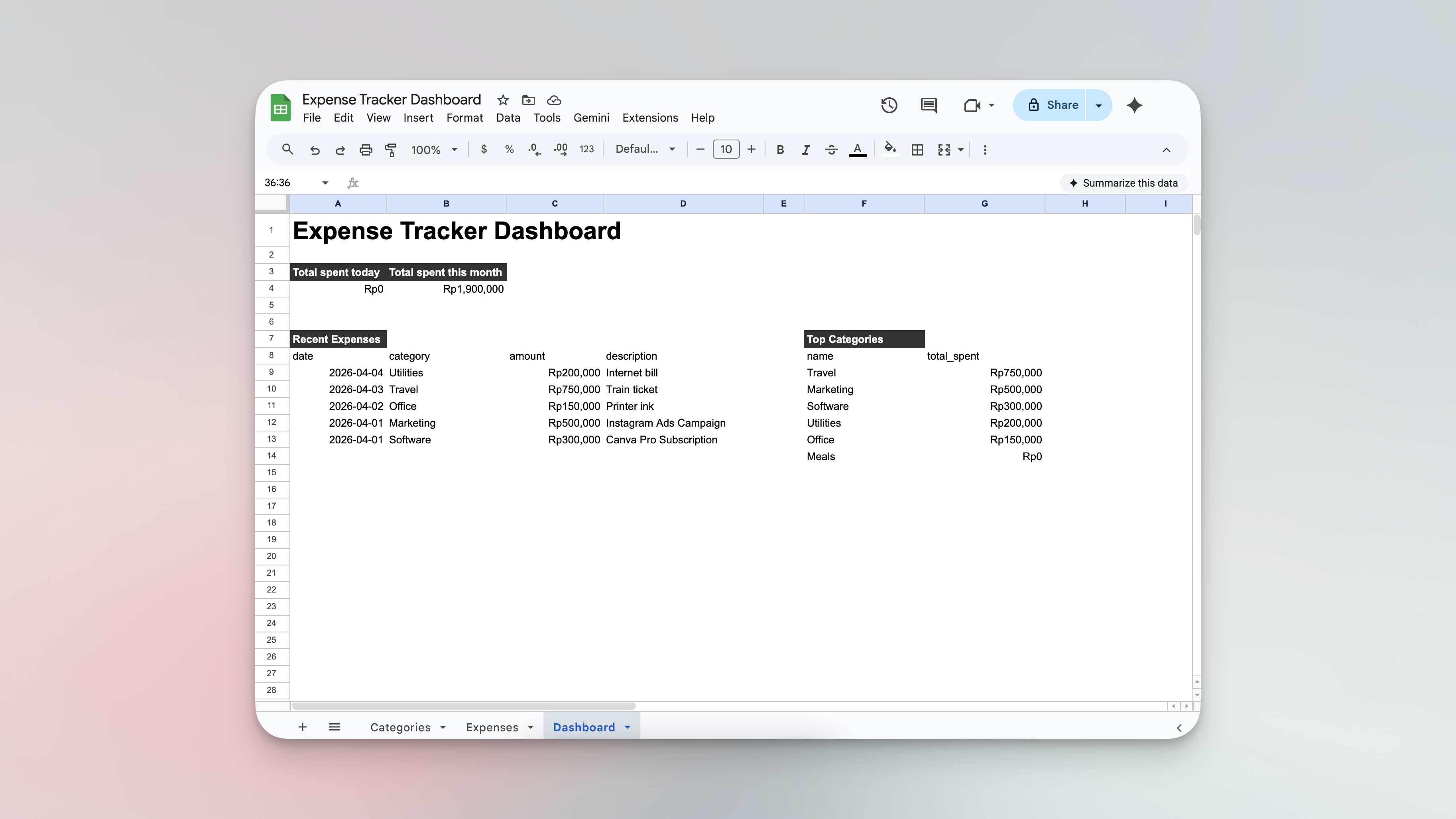
Managing expense tracking using spreadsheets - the process is chaotic
-
No automatic totalsCategory totals have to be summed manually, and one missed entry throws everything off.
-
No real-time spending viewThere's no single place to see what you've spent today or this month without recalculating from scratch.
-
Expenses go unrecordedWhen logging is inconvenient, entries get skipped — and the gaps quietly add up over time.
-
No category structureWithout defined spending buckets, costs blur together and patterns become impossible to spot.
-
No history or analyticsThere's no way to see which categories are consuming the most budget or when spending spikes occur.
Built for Anyone Who Spends Money Running a Business
If you've ever reached the end of the month wondering where your budget went, this template was made for you.
Simple to Log. Automatic to Total.
Here's the experience from the moment you record an expense.
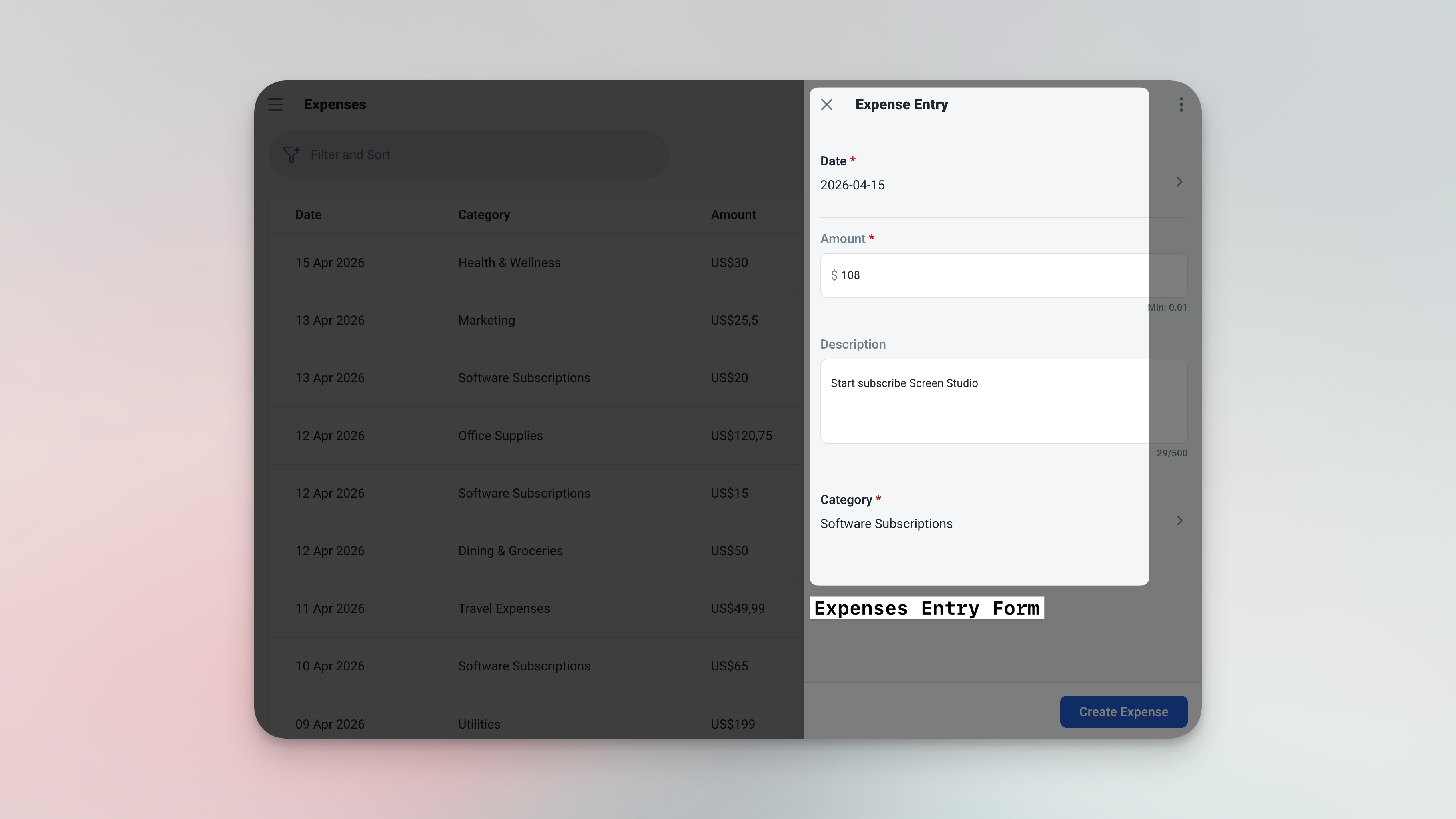
Logging an expense takes seconds — pick a category, enter the amount, and save.
-
1Open the app and add a new expensePick a category from your list, enter the amount, and add a short description. The date defaults to today — so most of the time, you're filling in just two fields.
-
2Category totals update on their ownNo formulas to maintain. The moment an expense is saved, the linked category total reflects it instantly — no manual recalculation needed.
-
3Open the dashboard — your spending picture is readySpent Today and Spent This Month sit at the top. Below that, your most recent expenses and your top spending categories — all without lifting a finger.
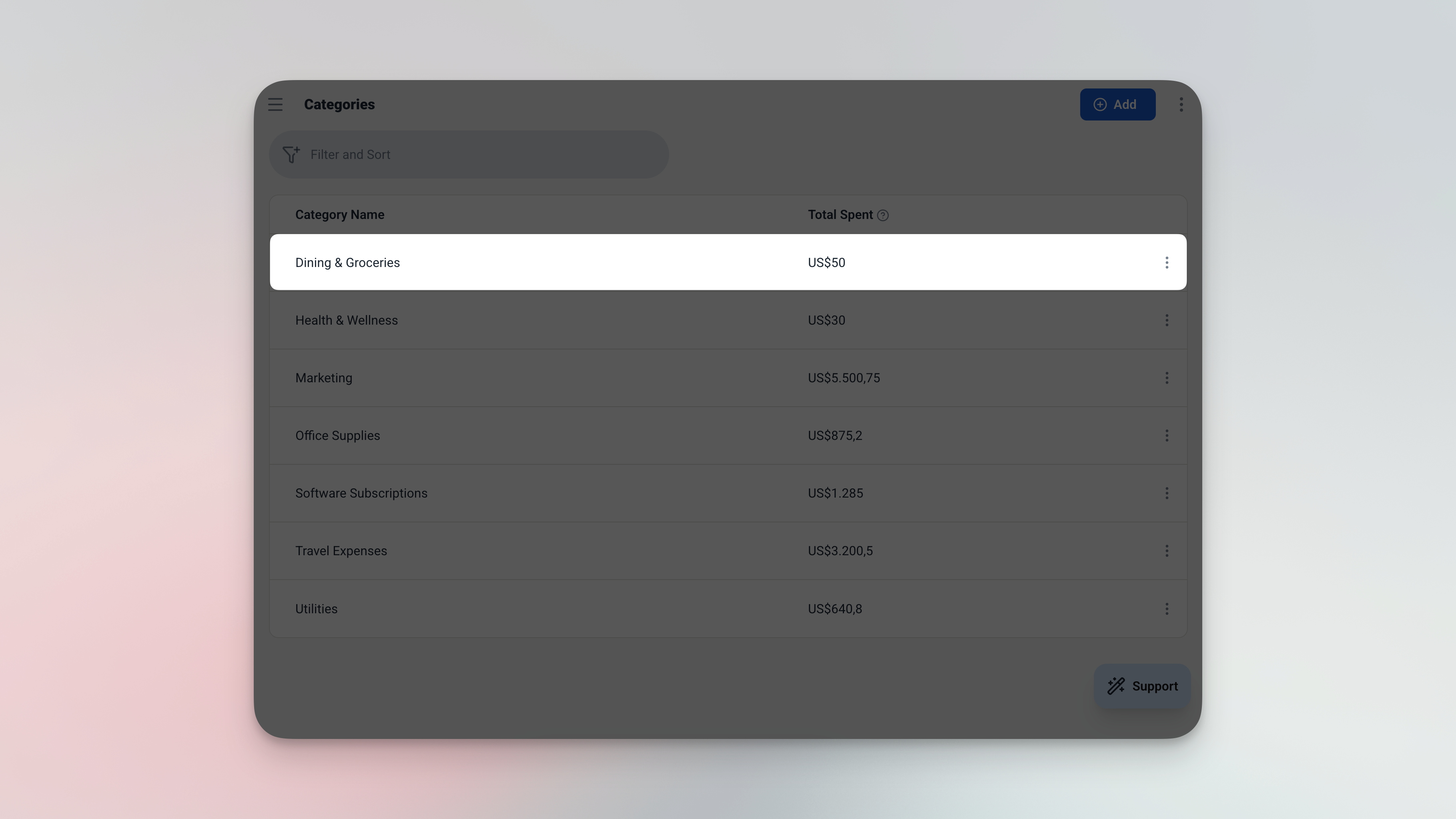
Category totals recalculate automatically every time a new expense is saved.
The Features That Keep Your Spending in Check
Every feature is designed to reduce friction — so tracking actually happens.
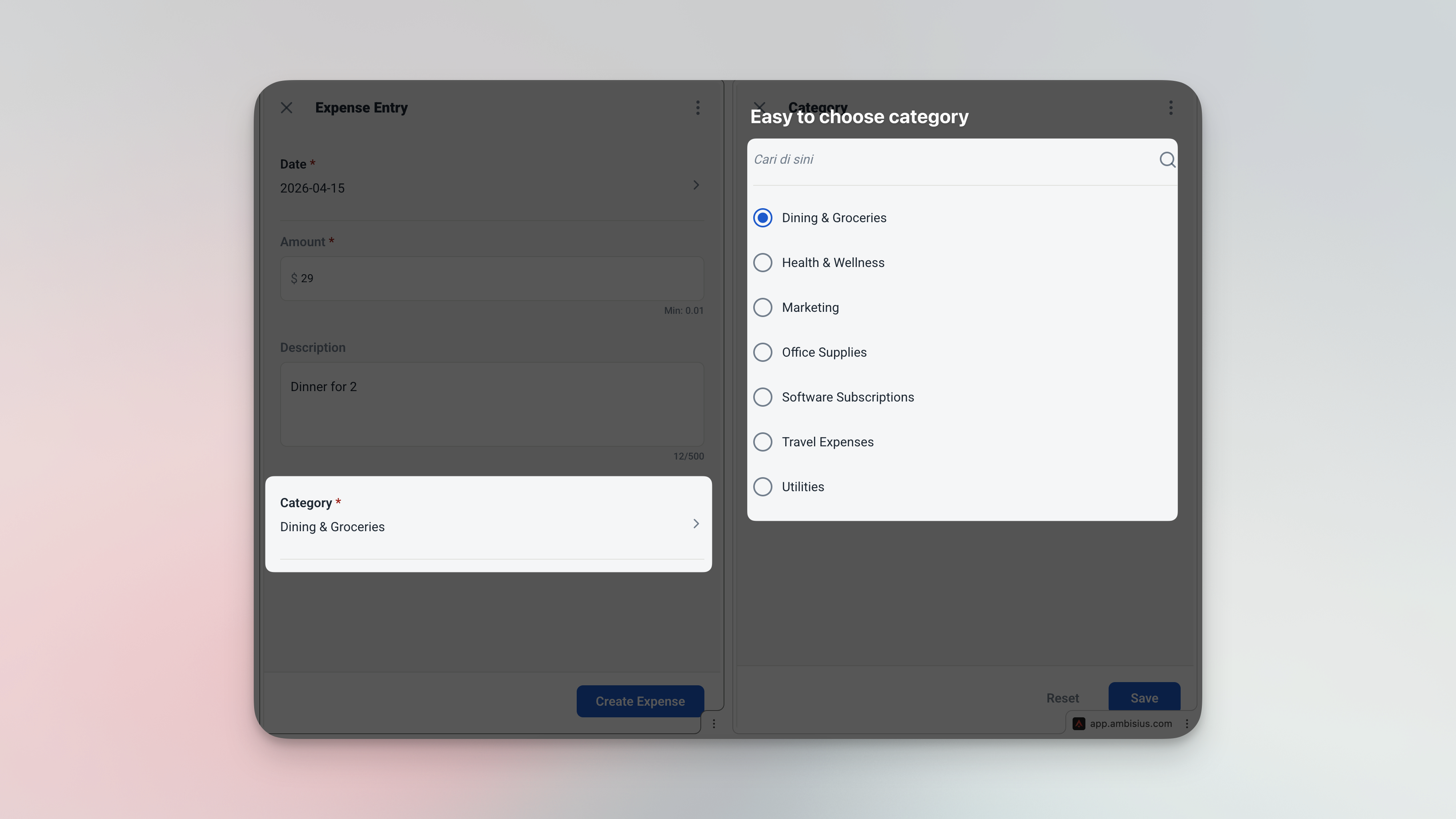
The expense form — date pre-filled, category dropdown ready, amount field waiting.
Two Tables. Everything Connected.
This template is intentionally lean — just two tables, set up and linked from the start.
Categories
Your spending buckets. Add as many as your business needs — they're immediately available when logging expenses.
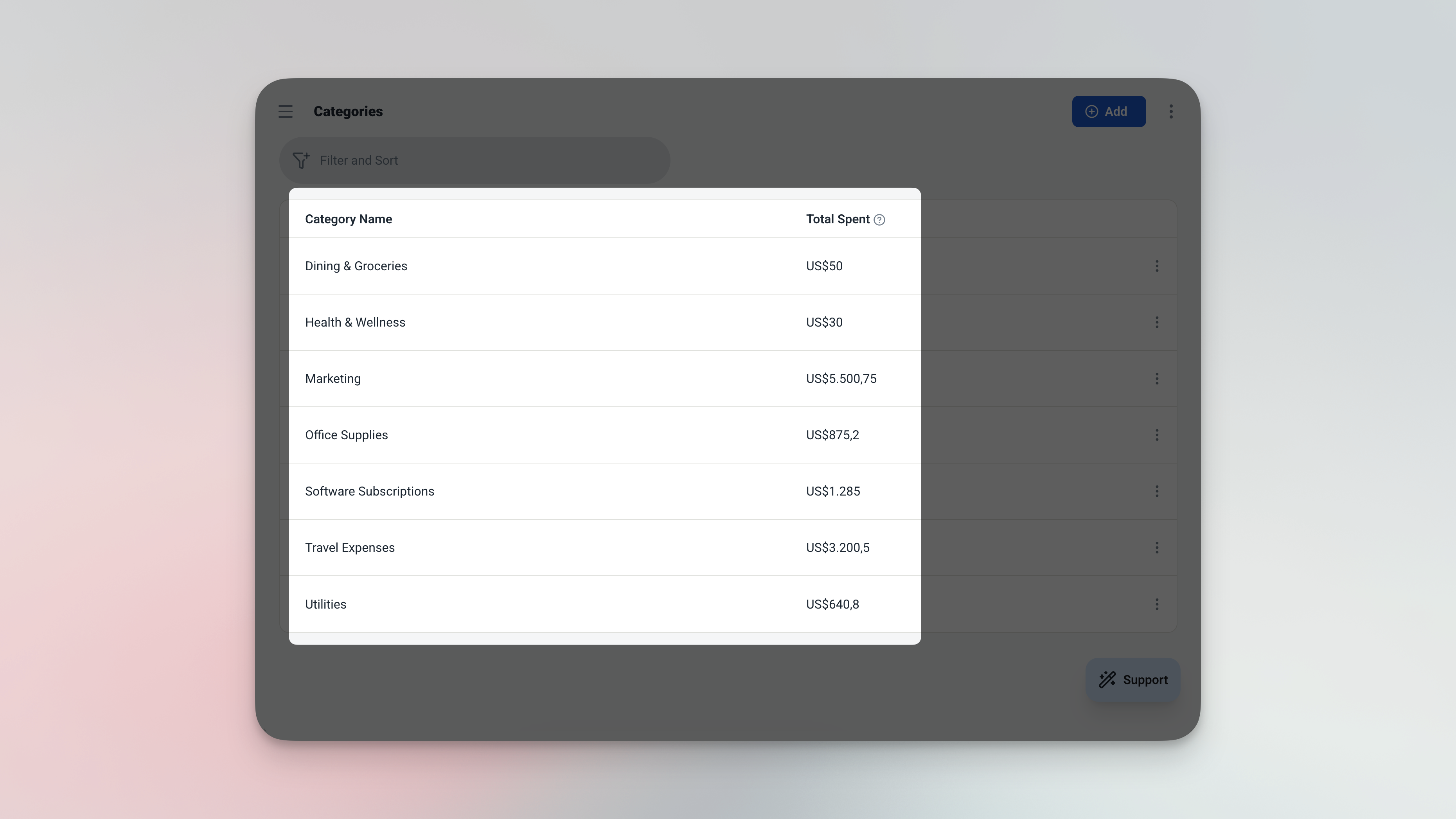
The Categories table — each row is a spending bucket with an auto-calculated total.
| Field | What It Stores |
|---|---|
| Name | Category label (e.g. Marketing, Travel, Office, Software) |
| Total Spent | Auto-summed from all expenses linked to this category |
Expenses
One row per expense. Four fields — that's all you need to build a complete spending record.
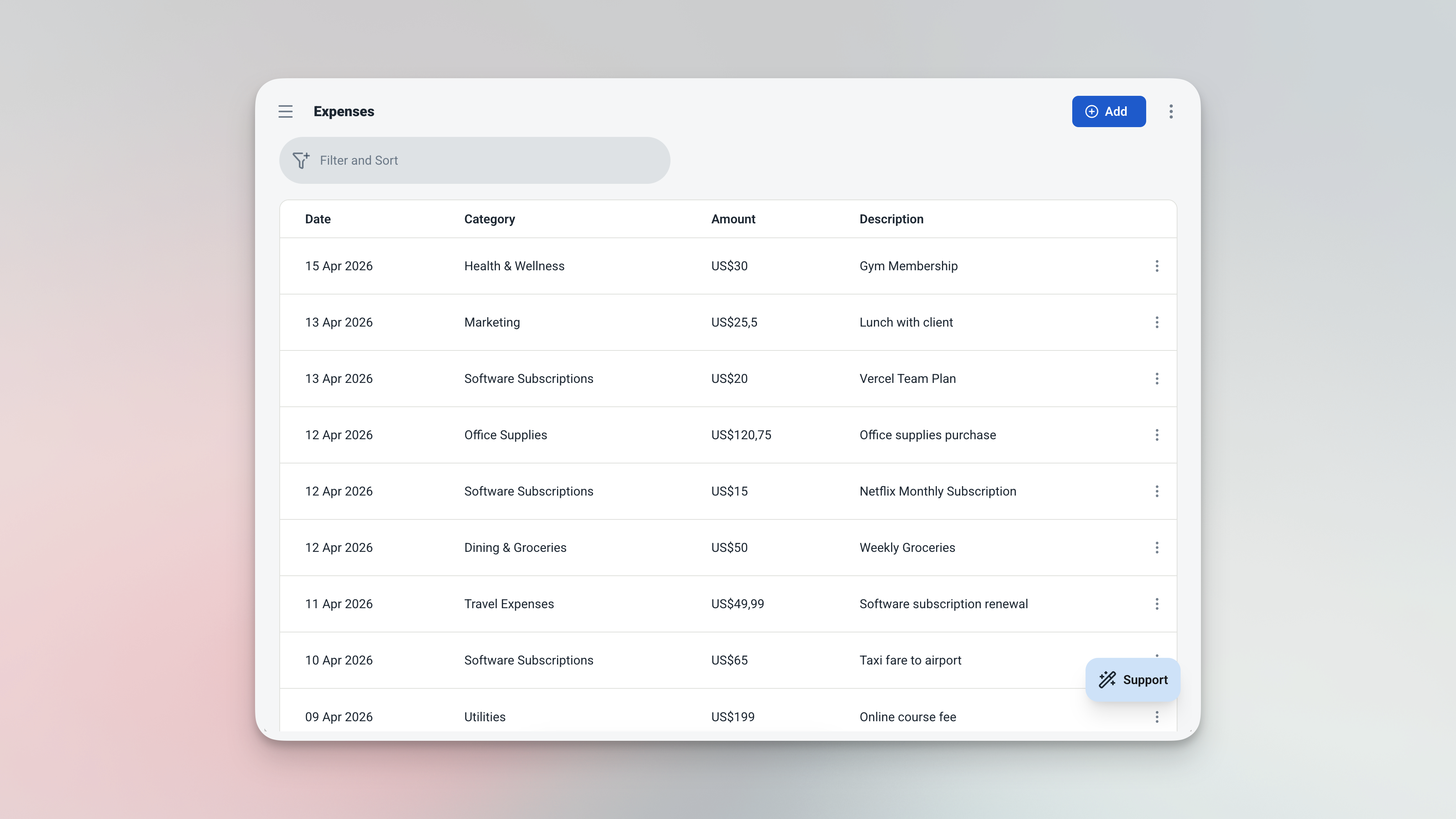
The Expenses table — every row is one expense, with category linked and amount recorded.
| Field | What It Stores |
|---|---|
| Date | When the expense happened — defaults to today |
| Category | Linked from your Categories list |
| Amount | How much was spent |
| Description | A short note on what it was for |
Your Spending Picture — Always Up to Date
Four widgets on the dashboard. A full analytics page when you need to go deeper.
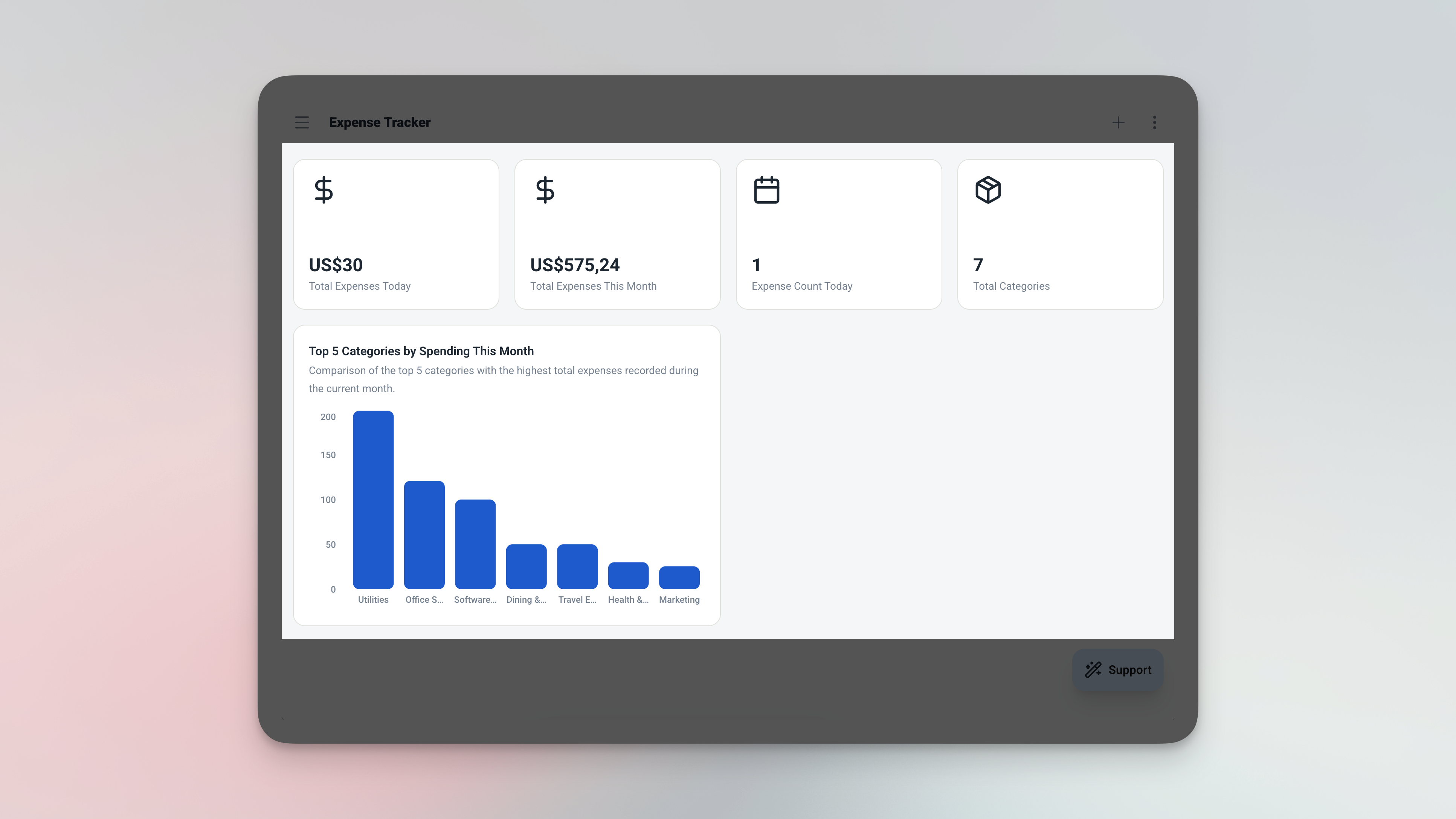
The dashboard — four widgets, zero setup, always current.
| Widget | What It Shows |
|---|---|
| 💰 Spent Today | Total amount logged today |
| 📅 Spent This Month | Running total since the 1st of the month |
| 🕐 Recent Expenses | Last 10 expenses, newest first |
| 🏆 Top Categories | Top 5 categories ranked by total spend |
Everything on the dashboard updates in real time. No refreshing, no recalculating — just open the app and your numbers are ready.
Analytics — Spot the Patterns
When you need a deeper look, the analytics page goes beyond the daily snapshot. Filter by date range or category to review a specific month, quarter, or project period.
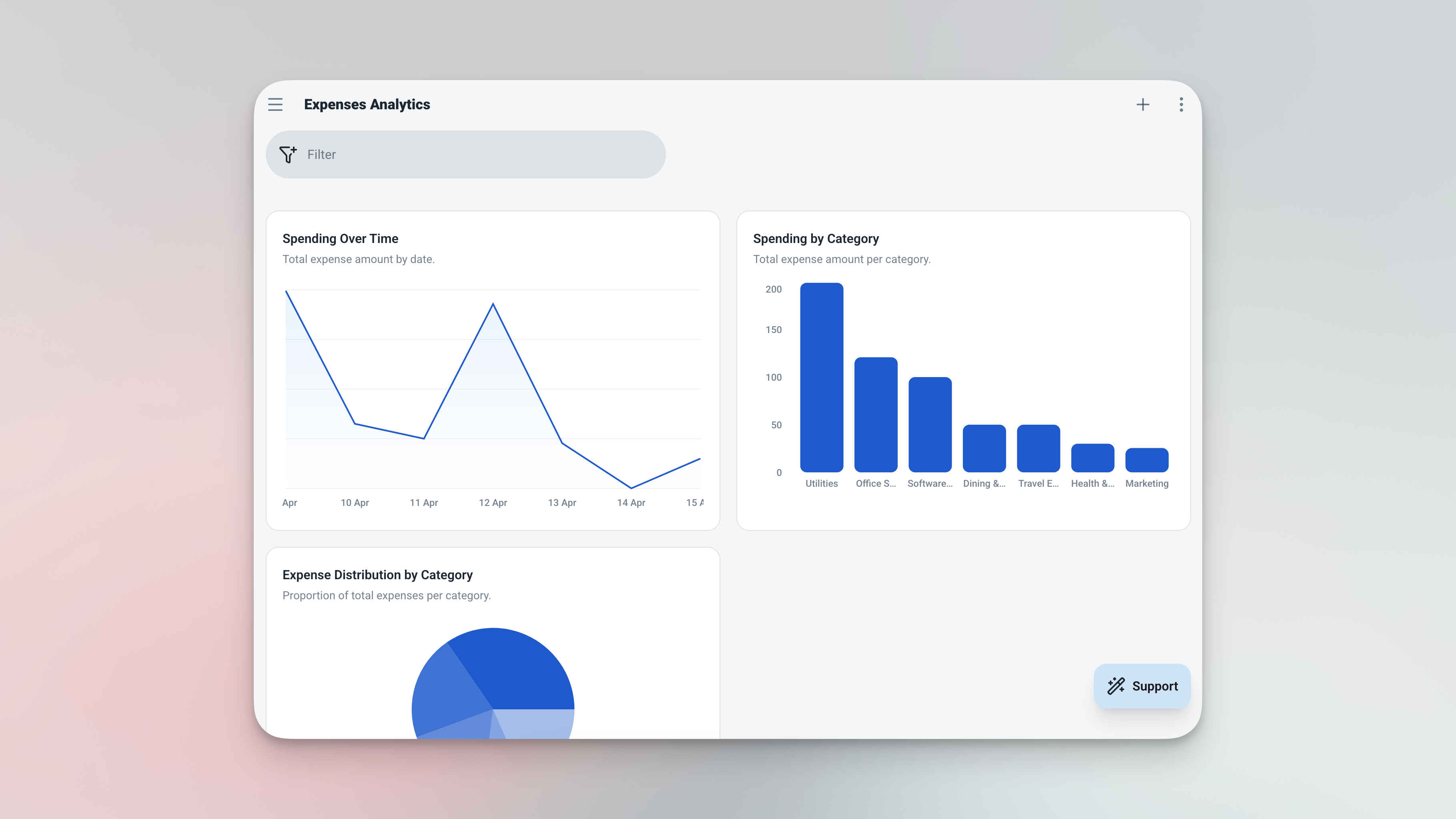
The analytics page — line chart, bar chart, and total metric with date and category filters.
Up and Running in Under 5 Minutes
Four steps from zero to a live expense tracker.
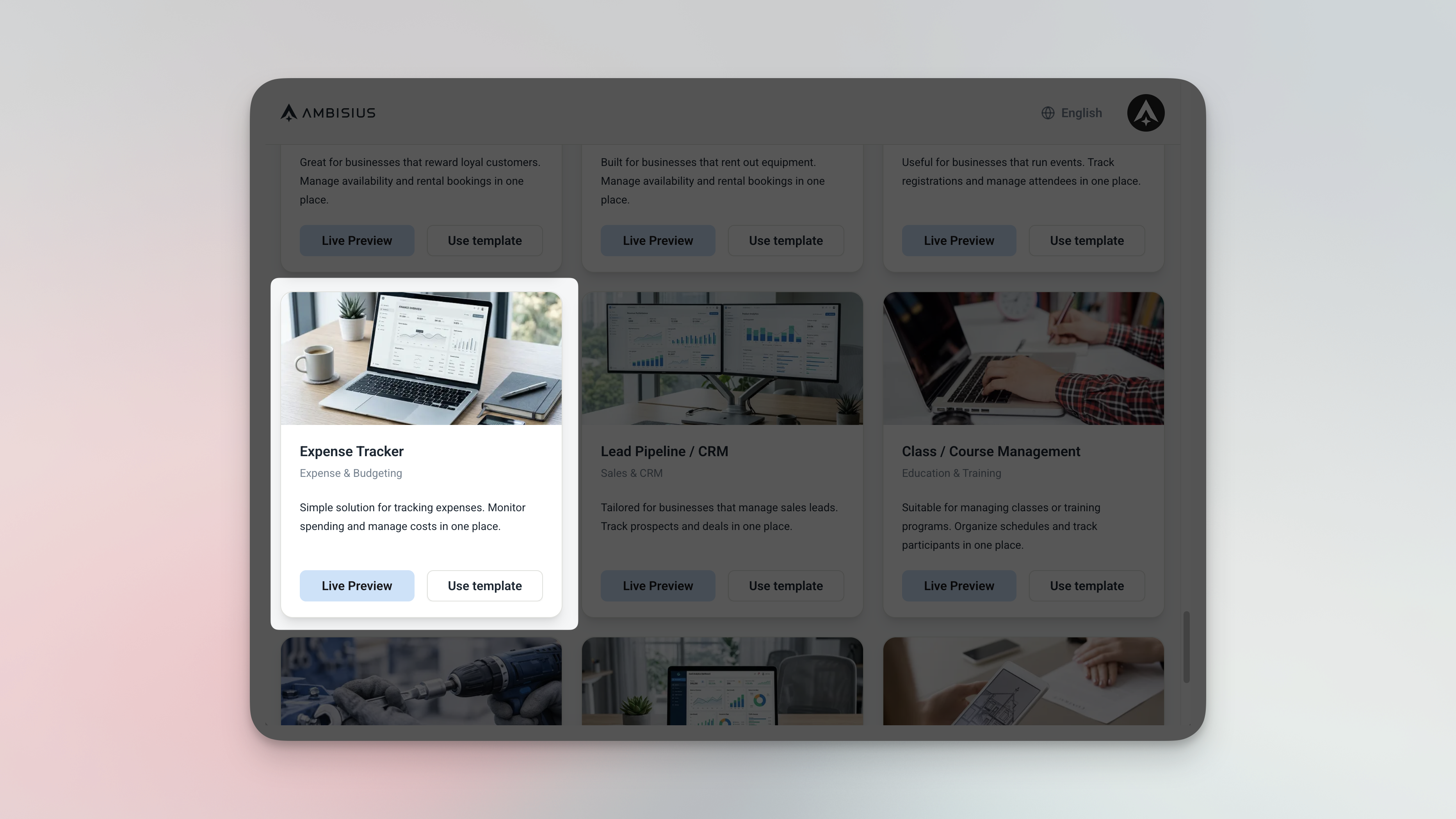
Find the Expense Tracker in the template catalogue — one tap to duplicate it into your account.
-
1Open Ambisius and browse the template catalogueFind the Expense Tracker template in the catalogue. No searching required — it's listed under Finance & Budgeting.
-
2Duplicate itOne tap copies the full template into your account — tables, dashboard, and analytics all included. Nothing to configure.
-
3Add your categoriesSet up your spending buckets — Marketing, Travel, Office, Software, or whatever fits your business. Just add rows to the Categories table.
-
4Log your first expensePick a category, enter the amount, hit save. Your dashboard updates instantly — your expense tracker is live.
Need Something Extra? Just Ask
The template works great out of the box — but if your business needs a small tweak, just type it in chat and the AI handles it.
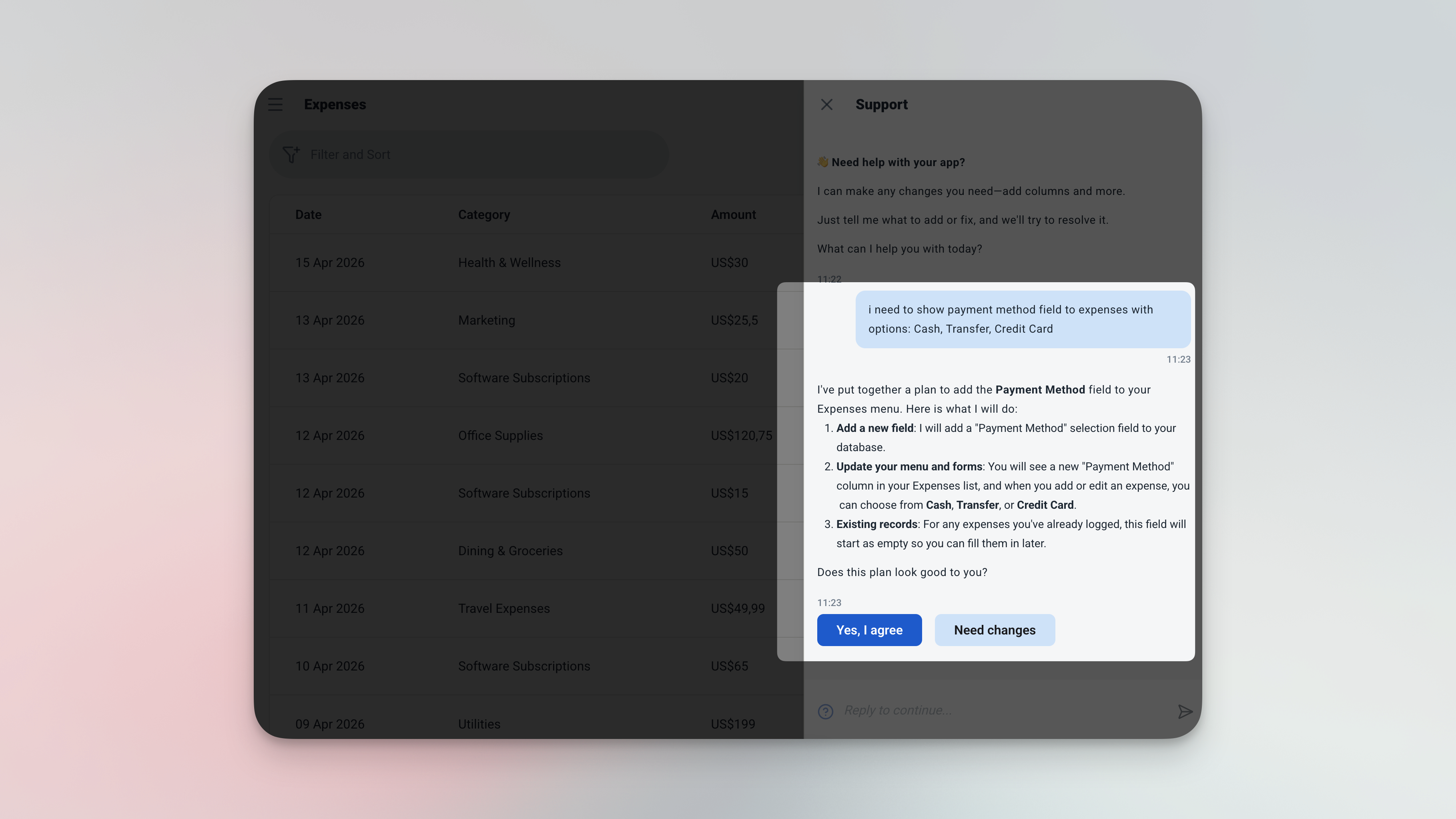
Type what you need — the AI adds the field, updates the form, and it's ready to use.
| Ask the AI | What Gets Added |
|---|---|
| "Add a payment method field — Cash, Transfer, Credit Card" | Track how each expense was paid |
| "Add a project field to expenses" | Useful for freelancers tracking costs per client or project |
| "Add a receipt photo field" | Attach an image of the receipt to each expense entry |
Already know your categories? No chat needed — just add rows directly to the Categories table and they're ready to use immediately.
Frequently Asked Questions
-
Can I use this template for free?Yes. The Expense Tracker template is free to activate. Exploring and chatting with the AI costs nothing — credits are only used when you confirm a change to the app.
-
Can I add my own expense categories?Absolutely. Just add new rows to the Categories table — Marketing, Rent, Equipment, whatever fits your business. They're immediately available when logging expenses.
-
How does the category total update?Automatically. Every time an expense is saved, the linked category's total recalculates itself. There's nothing to trigger or refresh manually.
-
Can my team log expenses too?Yes. Invite team members and set their access level — staff can log expenses without being able to edit categories or view the full analytics. You stay in control of what each person sees.
-
Can I filter expenses by month or category?Yes. The analytics page lets you filter by date range and category. Want to see only last month's travel costs? Two taps and it's there.
-
Does this work on mobile?Yes. Ambisius runs on iOS, Android, tablet, and any desktop browser. Log an expense the moment it happens — right from your phone.
Stop Guessing. Start Knowing.
Not knowing where your money is going isn't a small problem — it quietly affects every decision you make about your business.
The Ambisius Expense Tracker template gives you a clear, real-time picture of your spending — by day, by month, and by category. It takes minutes to set up, seconds to use, and works on every device you already own.
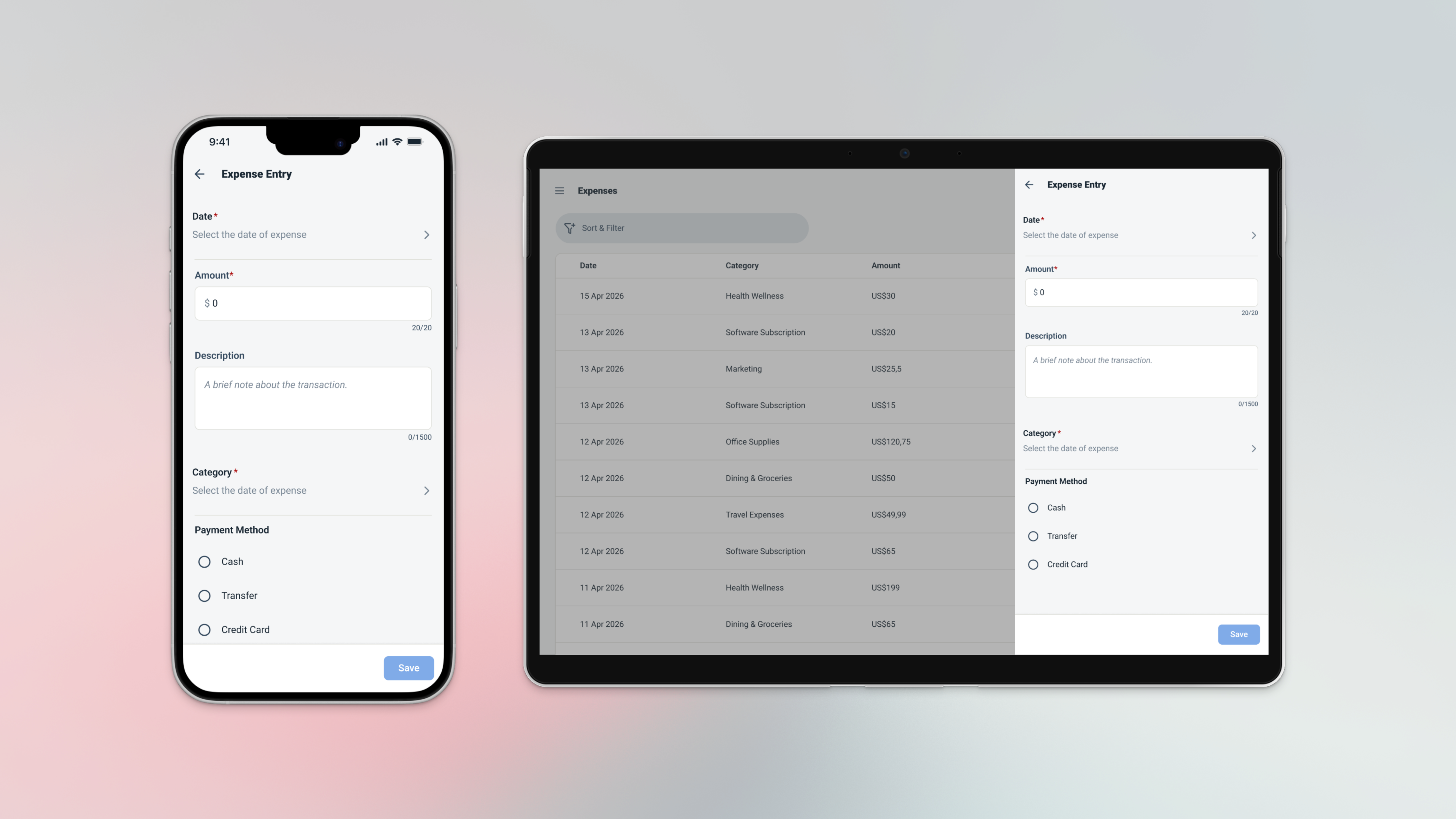
Log your first expense today — and see exactly where your money is going.