



Cover image for Ambisius Class and Attendance App Template.
You Shouldn't Need a Paper Register to Run Your Classes
Every week, the same routine. Call out names. Wait for hands. Tick boxes on a sheet. Then later — try to figure out who's been missing too many sessions, which course is oversubscribed, and whether attendance is actually improving.
Paper registers get lost. WhatsApp groups don't track anything. And by the time you notice a student has missed five sessions in a row, it's already too late to help them.
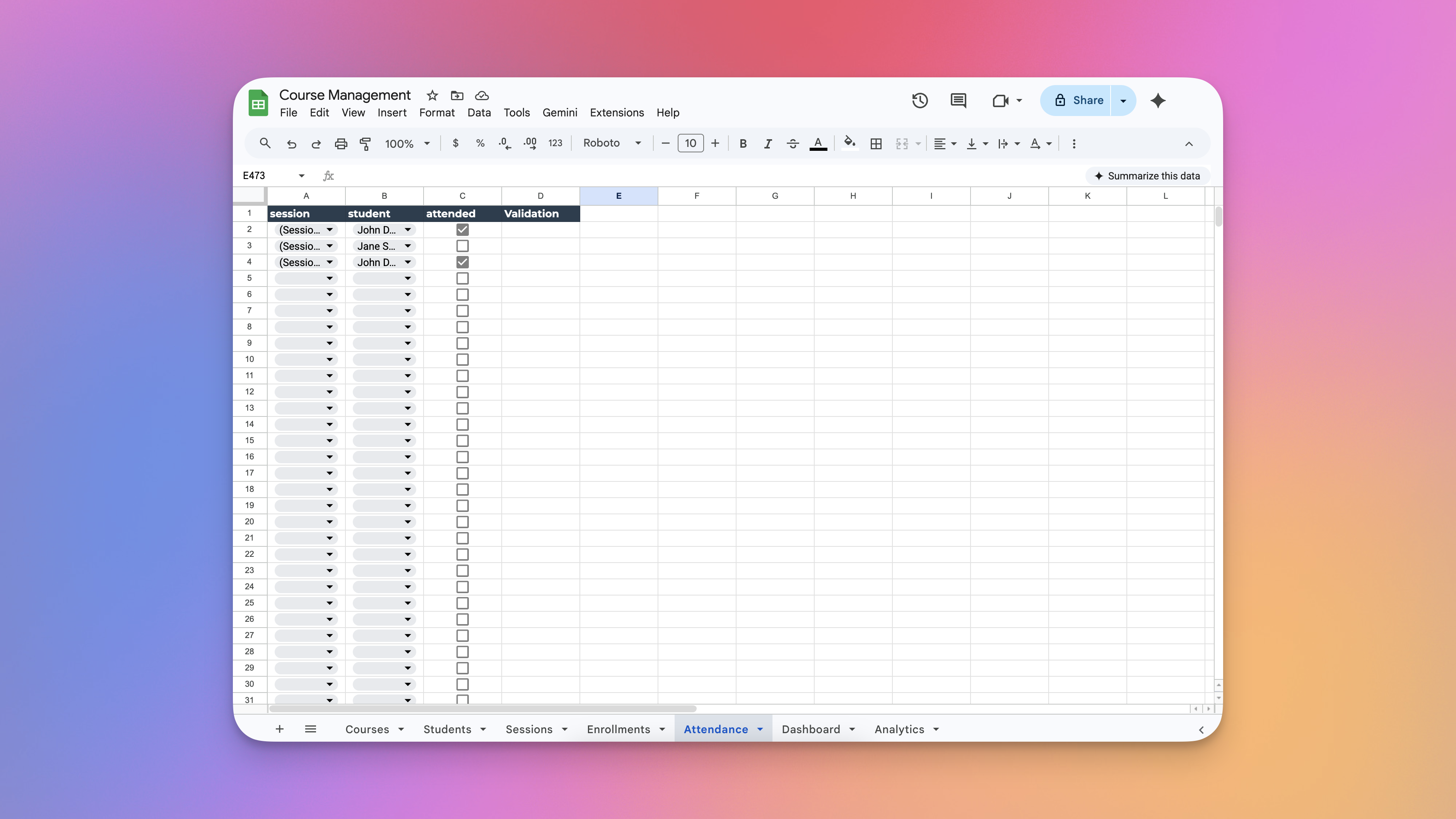
Managing class and attendance using spreadsheets - the process is chaotic.
-
No visibility on absencesWithout a system, you only notice a student has been missing after it's already a problem — not while there's still time to act.
-
Over-enrollment happens accidentallyWithout a capacity check, courses fill beyond their limit — leading to crowded sessions and awkward conversations with students.
-
Attendance rates require manual countingCalculating who attended what percentage of sessions means opening a spreadsheet, counting rows, and hoping you didn't make an error.
-
No single place for schedule + recordsSession schedules live somewhere, attendance records live somewhere else, and enrollment lists are in a third place — nothing connects.
-
Not accessible from every devicePaper and local spreadsheets only exist where they were created — your team can't mark attendance on mobile or check records on the go.
Built for Anyone Who Runs Classes
Whether you teach ten students or manage a hundred, this template works straight out of the box.
Simple to Use. Surprisingly Powerful.
Here's what the experience looks like from day one — six steps, each one handled automatically.
-
1Set up your coursesAdd each course with a name and a maximum student count. The app tracks how many students are enrolled in real time — no manual counting.
-
2Enroll studentsLink a student to a course. If the course is already full, enrollment is blocked automatically — no awkward manual checks required.
-
3Schedule sessionsCreate a session for a course on a specific date and time. The app connects it to the right course and all its enrolled students automatically.
-
4Mark attendanceFor each session, mark each student as attended or not — a simple yes/no toggle. No columns to add, no formulas to write, no setup needed.
-
5Attendance rate calculates itselfThe app counts who attended, checks how many are enrolled, and shows the attendance rate for every session — updated automatically every time a toggle is changed.
-
6Open the app — your day is readyThe dashboard shows today's sessions, the overall average attendance rate, and what's coming up next. No filtering, no searching — just open and go.
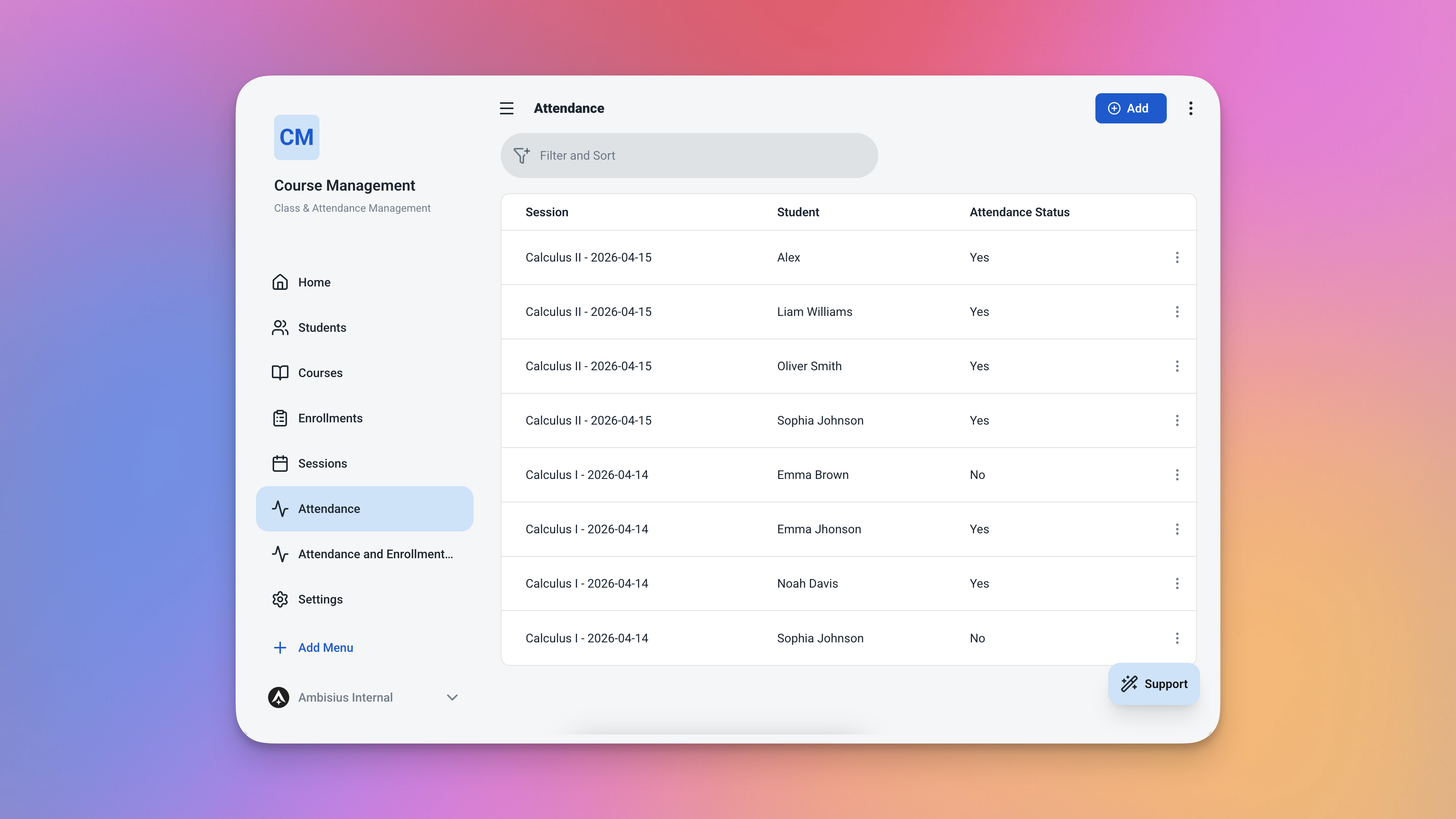
Marking attendance is one toggle per student — the whole class done in seconds.
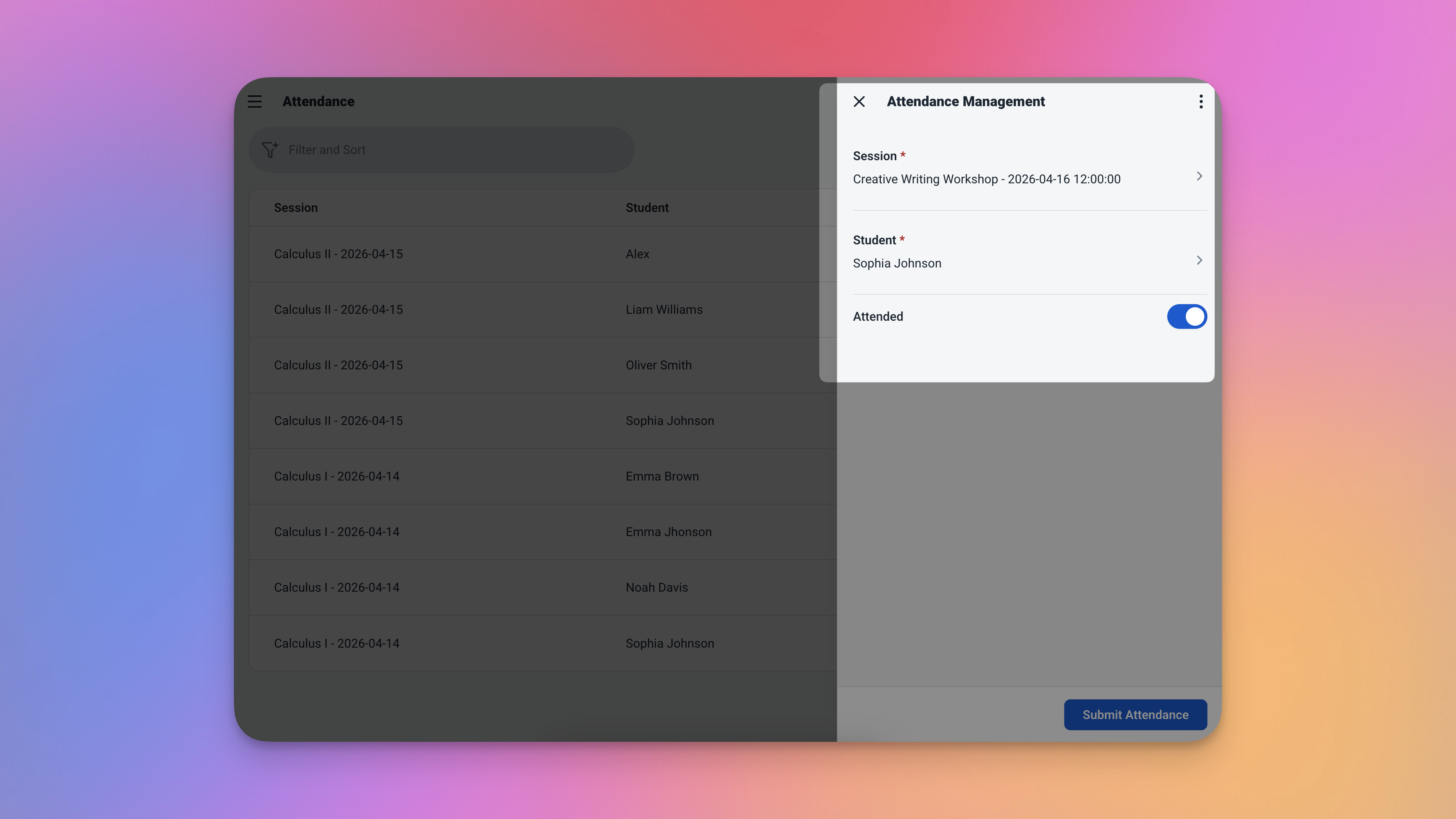
Every session shows its own attendance rate — calculated automatically, no formulas needed.
The Features That Keep Your Classes Running Smoothly
Four built-in features that handle the parts of class management that usually fall through the cracks.
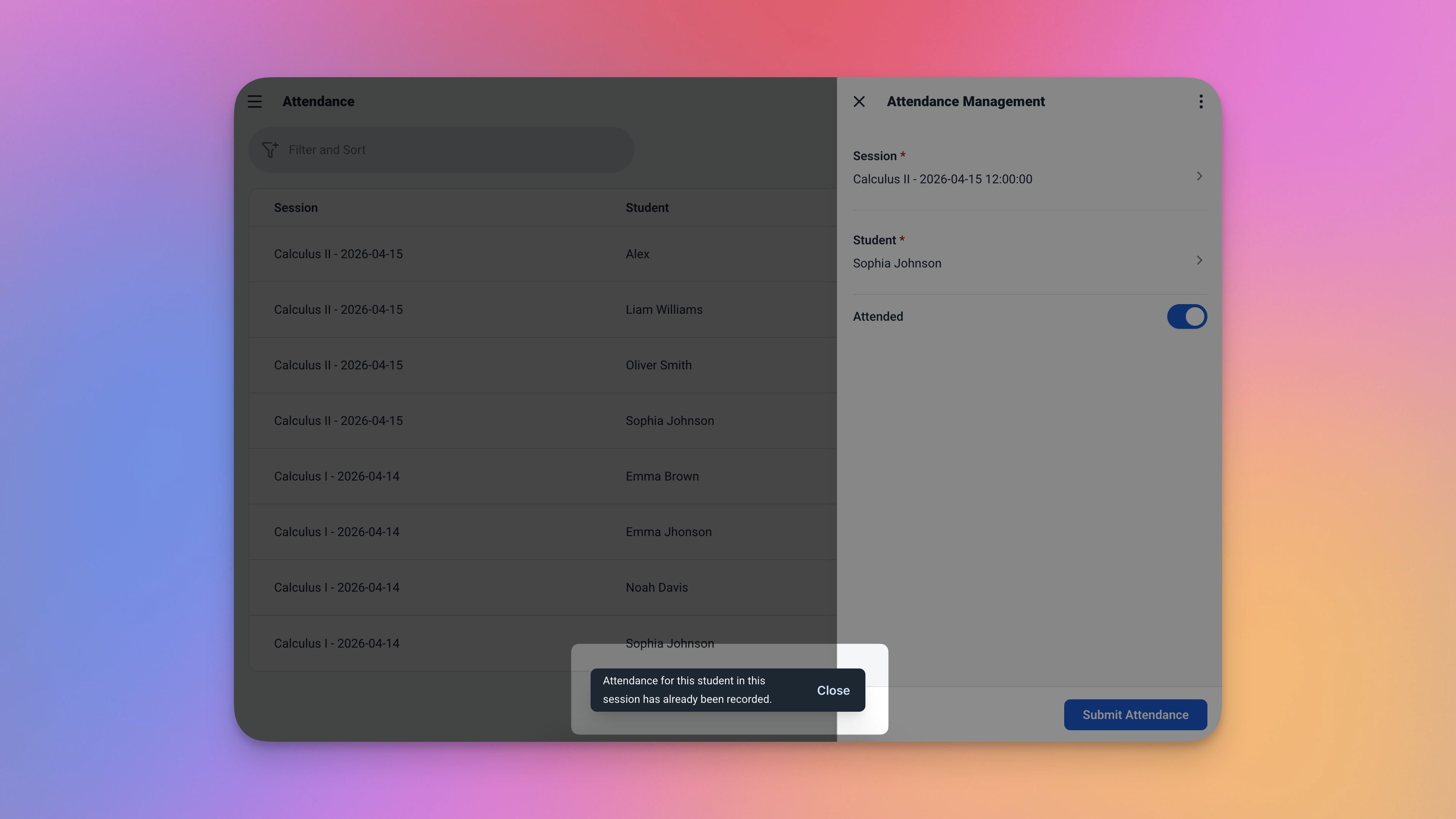
When a course is full, the app blocks the enrollment attempt automatically — no manual checking required.
How the Attendance Rate Is Calculated
The formula is straightforward — and the app runs it automatically every time attendance is marked.
Attendance Rate (%) = (Total Attended ÷ Total Enrolled) × 100
Every session shows its own rate — and the dashboard shows the overall average across all sessions. You never have to open a calculator or touch a spreadsheet.
5 Tables — All Connected and Ready to Use
This template comes with five pre-configured tables. Everything is linked together — you just add your real data and start.
Courses
The starting point. Every class your business offers lives here.
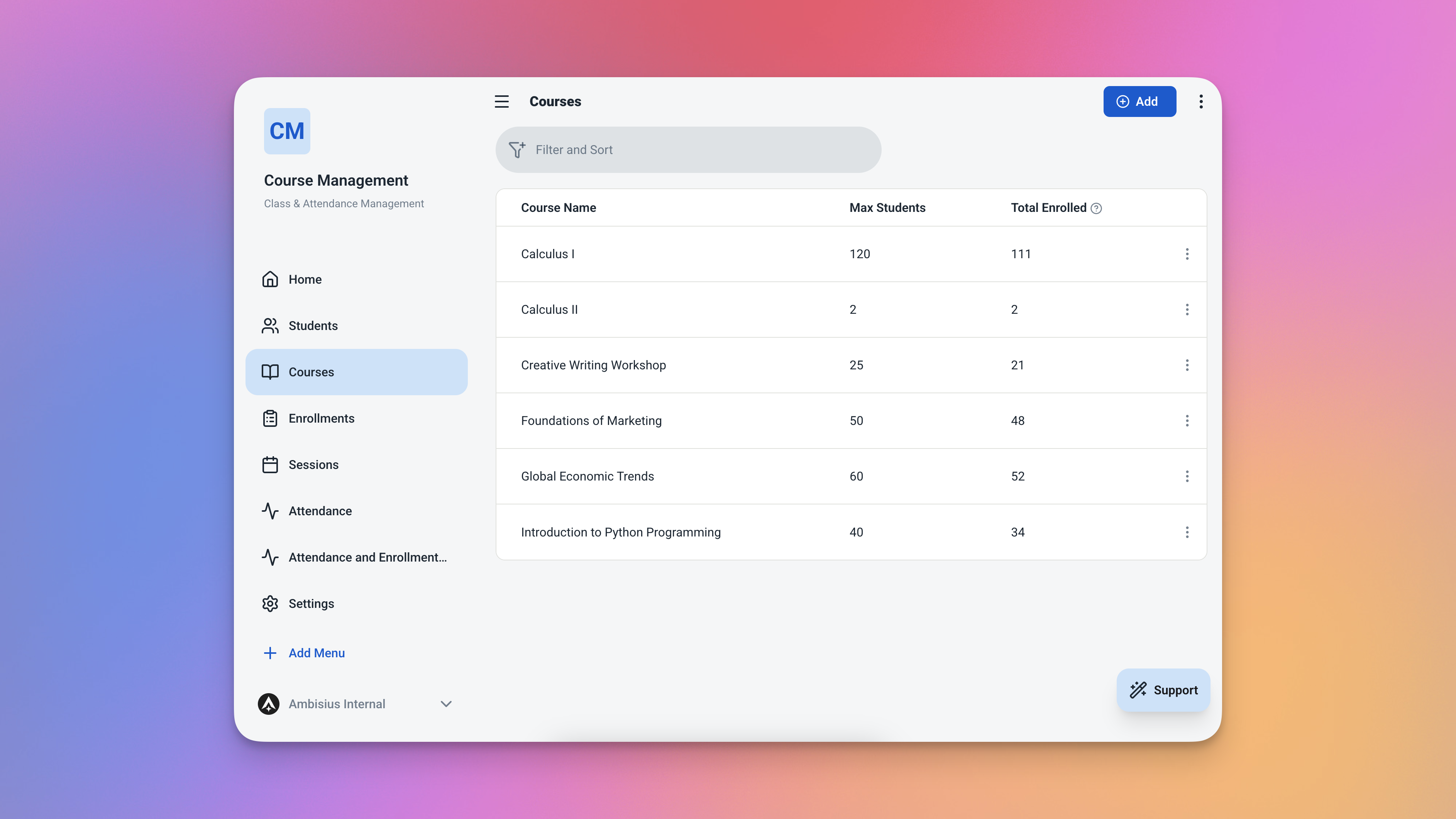
The Courses table — define each class once, and the app tracks enrollment in real time.
| Field | What It Stores |
|---|---|
| Name | Course name (e.g. Beginner English, Saturday Yoga) |
| Max Students | The enrollment cap for this course |
| Total Students | Auto-counted from enrollments — always up to date |
Students
A simple record for every student you work with.
| Field | What It Stores |
|---|---|
| Name | Student's full name |
| Phone | Contact number |
Sessions
Each class session — linked to a course, with a date, time, and auto-calculated attendance fields.
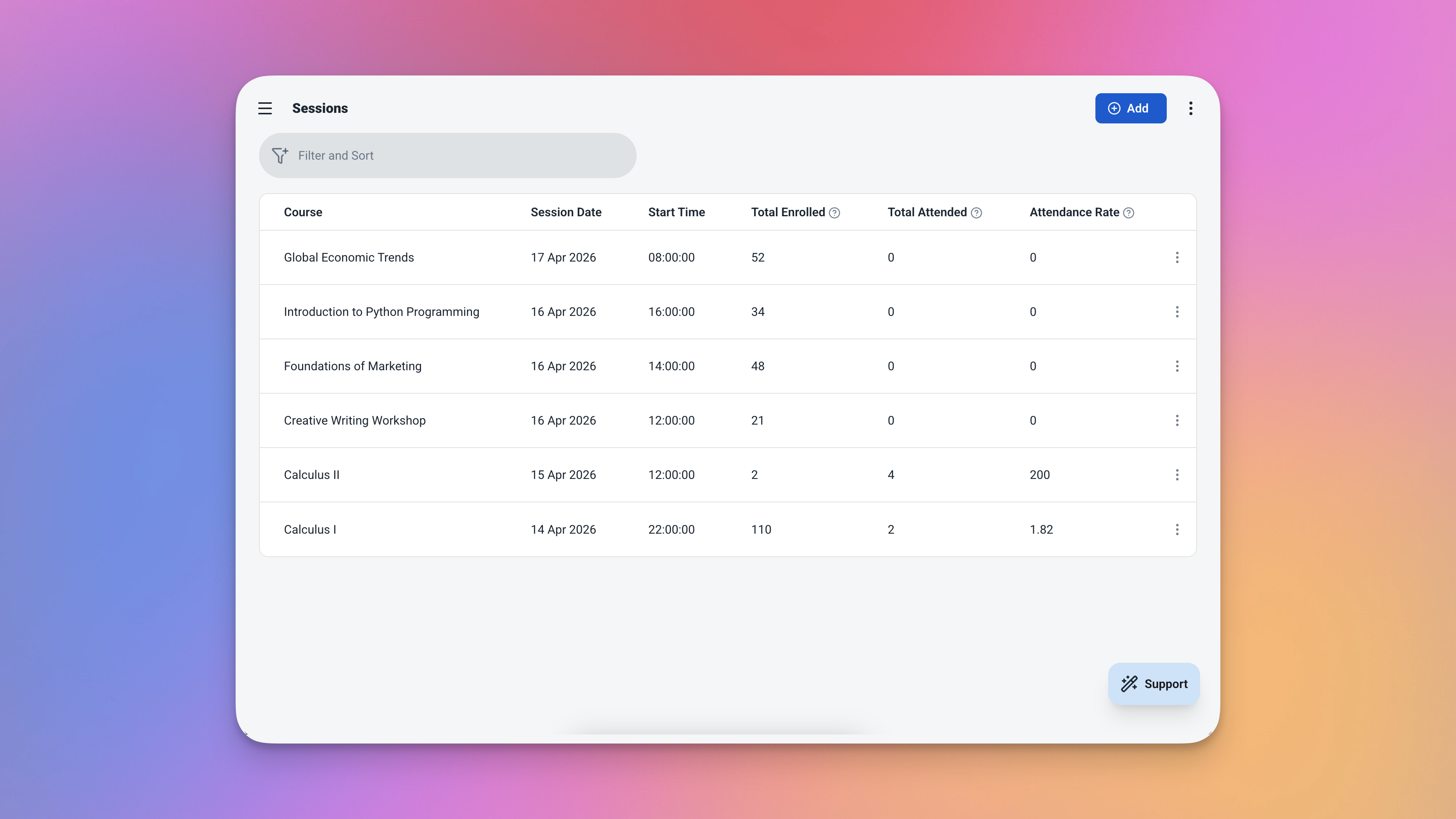
The Sessions table — every class record with attendance data calculated automatically.
| Field | What It Stores |
|---|---|
| Course | Linked from Courses table |
| Date | Session date |
| Start Time | When the session begins |
| Total Attended | Auto-counted from attendance records |
| Total Enrolled | Auto-counted from course enrollments |
| Attendance Rate | Calculated automatically — no formulas needed |
Enrollments
Links a student to a course — with the enrollment date recorded automatically.
| Field | What It Stores |
|---|---|
| Student | Linked from Students table |
| Course | Linked from Courses table |
| Enrollment Date | Recorded automatically as today's date |
Attendance
The record of who showed up to each session — linked to both a session and a student.
| Field | What It Stores |
|---|---|
| Session | Linked from Sessions table |
| Student | Linked from Students table |
| Attended | Yes / No toggle — defaults to No |
Everything You Need to See — Without Digging for It
Open the app and your day is already laid out — no filtering, no searching, no setup.
Dashboard — Your Daily & Weekly View
Four things are immediately visible the moment you open the app.
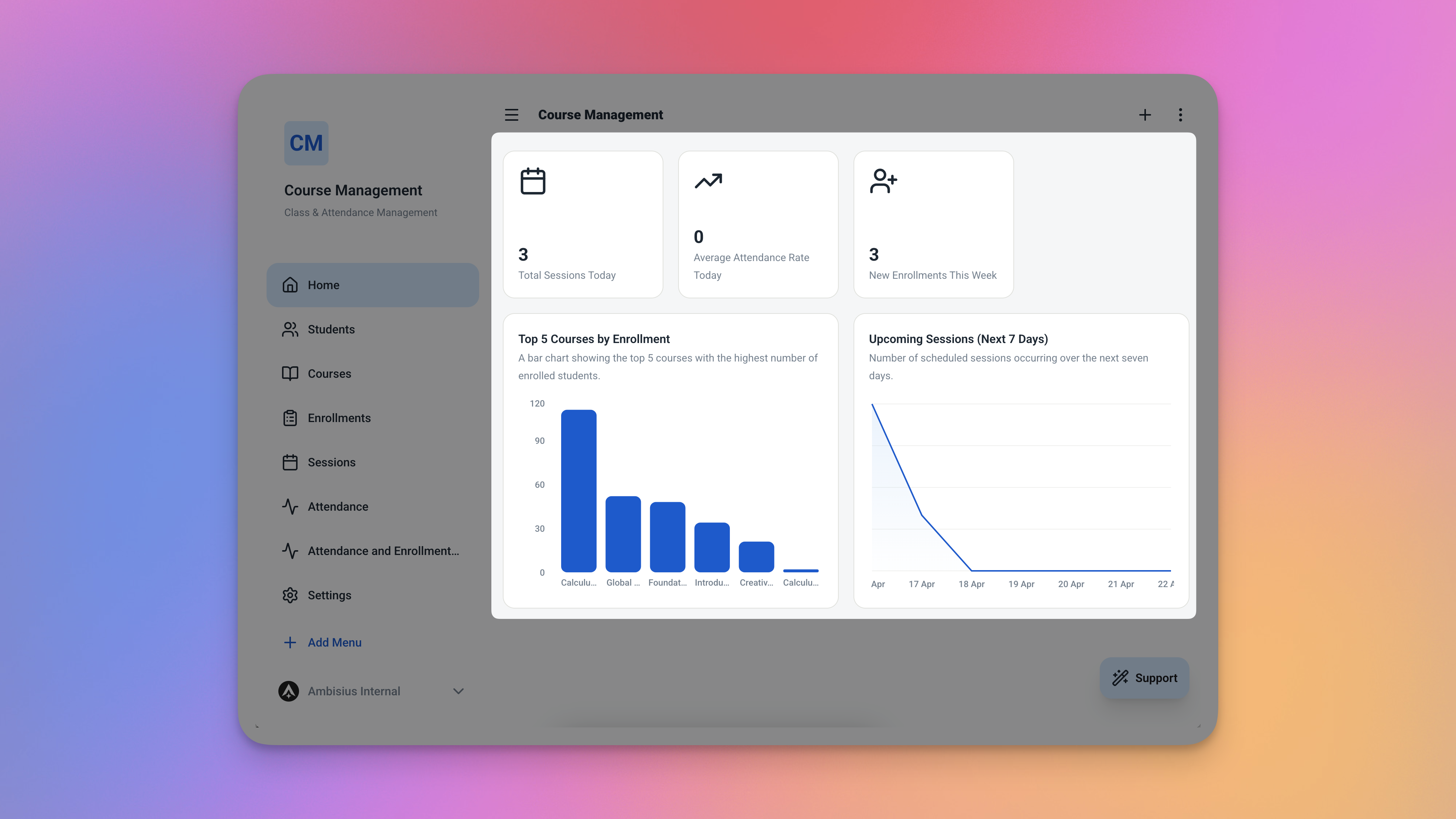
The dashboard — sessions today, attendance rate, today's full schedule, and upcoming sessions all in one view.
-
Sessions TodayHow many classes are running today — at a glance, without opening anything else.
-
Average Attendance RateOverall rate across all sessions — a quick health check for your entire operation.
-
Today's SessionsFull schedule for today sorted by start time — every class, in order, ready to act on.
-
Upcoming SessionsNext scheduled sessions sorted by date — so you always know what's coming and can prepare ahead.
Analytics — Spot Patterns Before They Become Problems
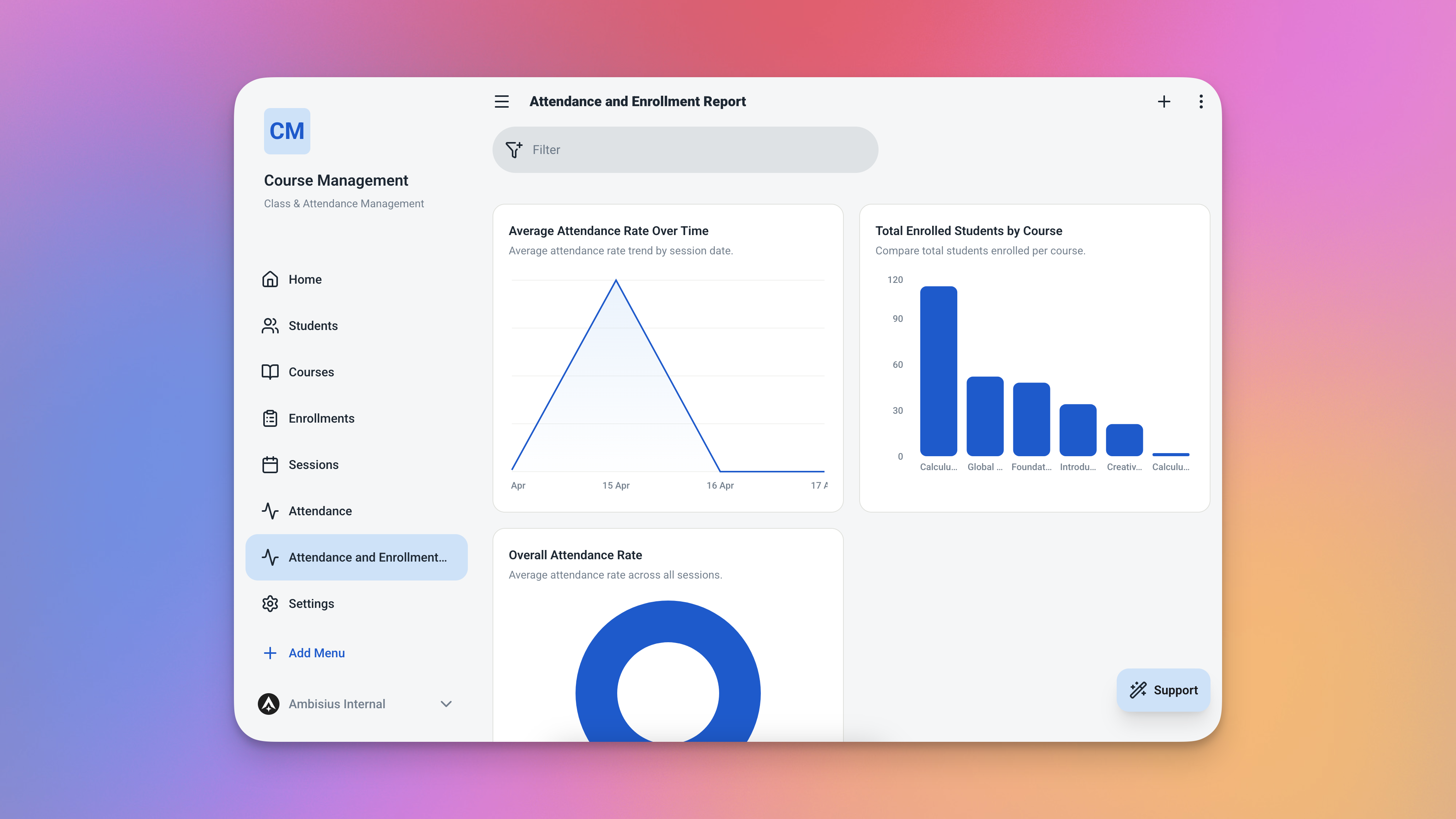
The Analytics page — filter by date range or course to zoom in on what matters most.
| Chart | What It Shows | Why It Matters |
|---|---|---|
| 📈 Attendance Rate Over Time | Daily average attendance rate as a trend line | Spot if engagement is dropping across sessions |
| 📊 Students by Course | Enrollment count per course as a bar chart | See which courses are popular and which are undersubscribed |
| 🔢 Overall Attendance Rate | Single metric — average across all sessions | Quick health check for your entire operation |
Ready in Minutes — No Setup Required
Four steps from the template catalogue to taking your first attendance.
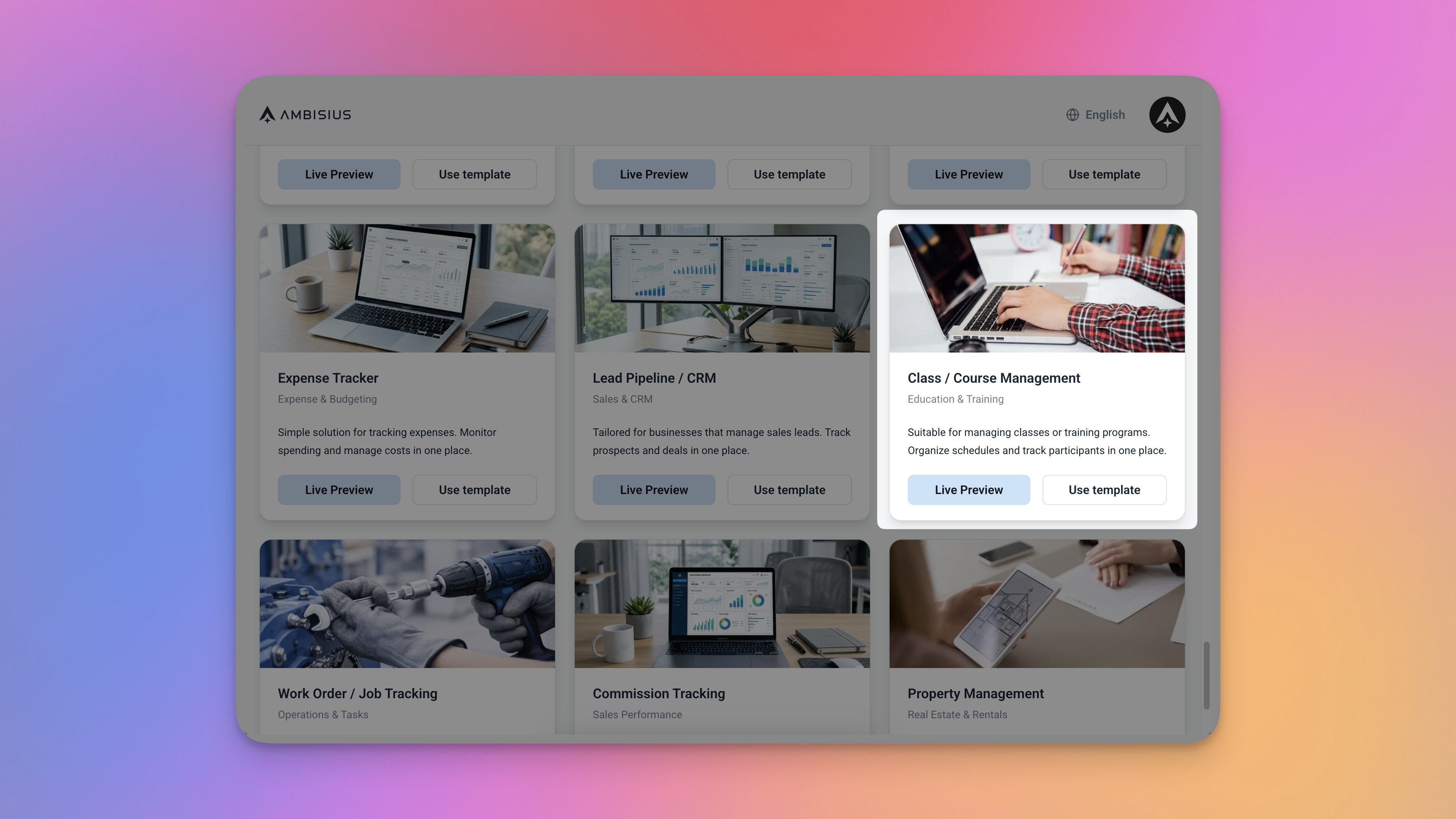
Find the Class & Attendance Tracker in the Ambisius template catalogue — one tap to duplicate.
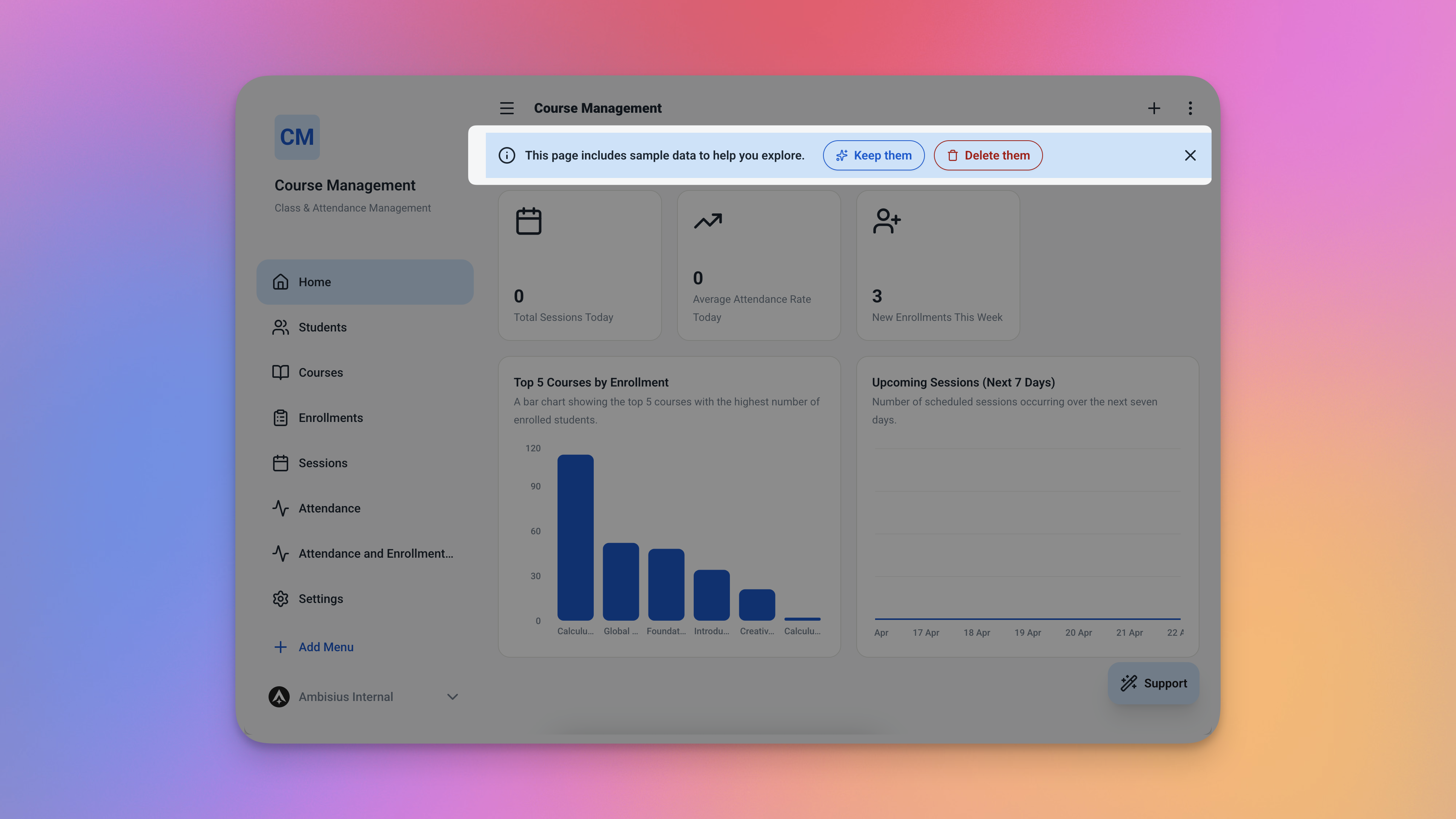
After duplicating, the full app is in your account — all 5 tables, rules, dashboard, and analytics included.
Need Something Extra? Just Ask
The template works great as-is — but every business is a little different. If you need to adjust or extend it, just tell the AI what you want in plain language.
-
"Add a topic field to sessions"Record what was covered in each class — useful for lesson planning and progress tracking.
-
"Add a fee field to enrollments"Track how much each student paid when they enrolled — simple fee records without a separate tool.
-
"Add an instructor field to sessions"Assign a specific teacher or trainer to each session — useful for centers with multiple staff.
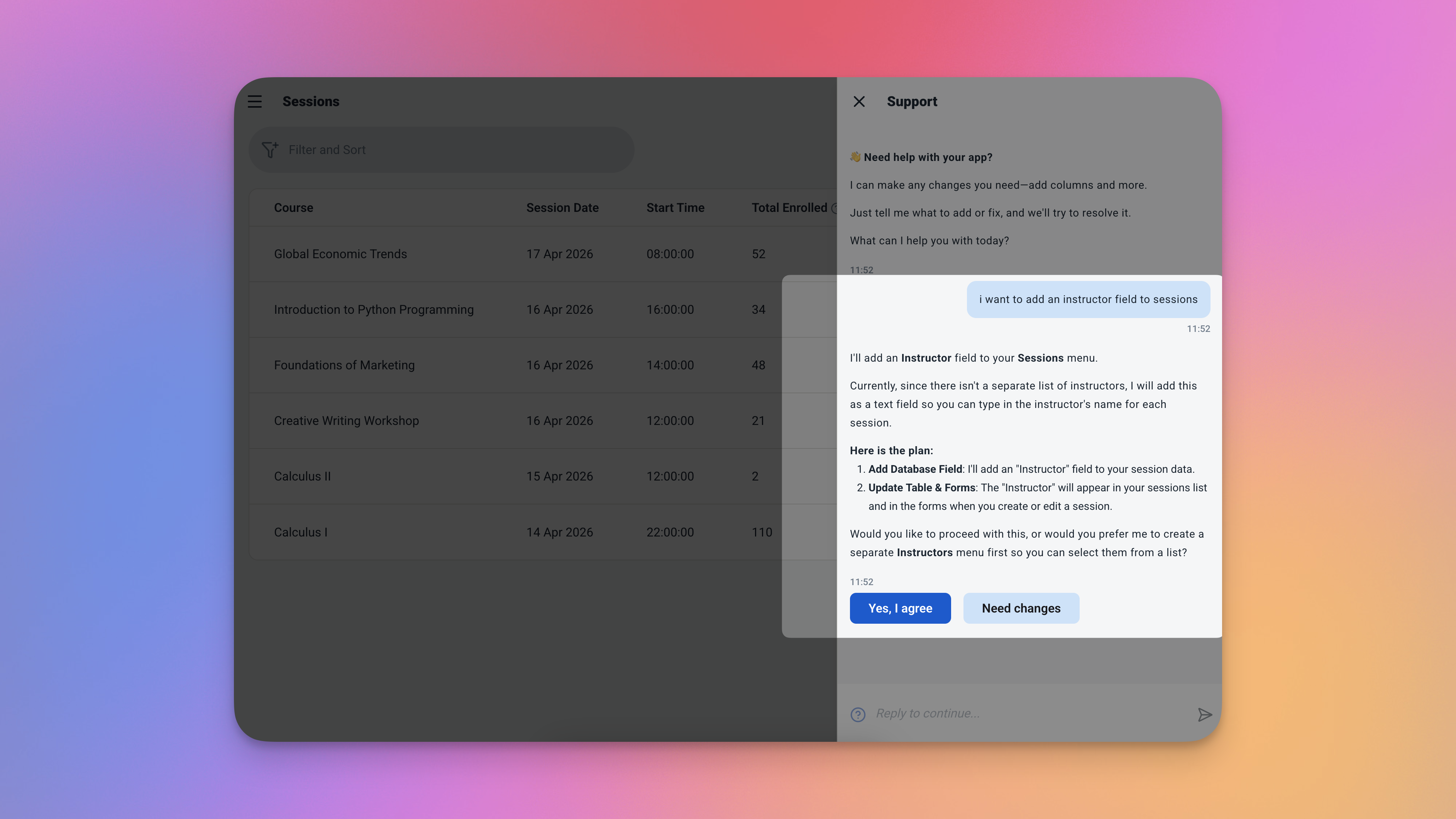
Just type what you need in plain language — the AI builds the change for you, no technical knowledge required.
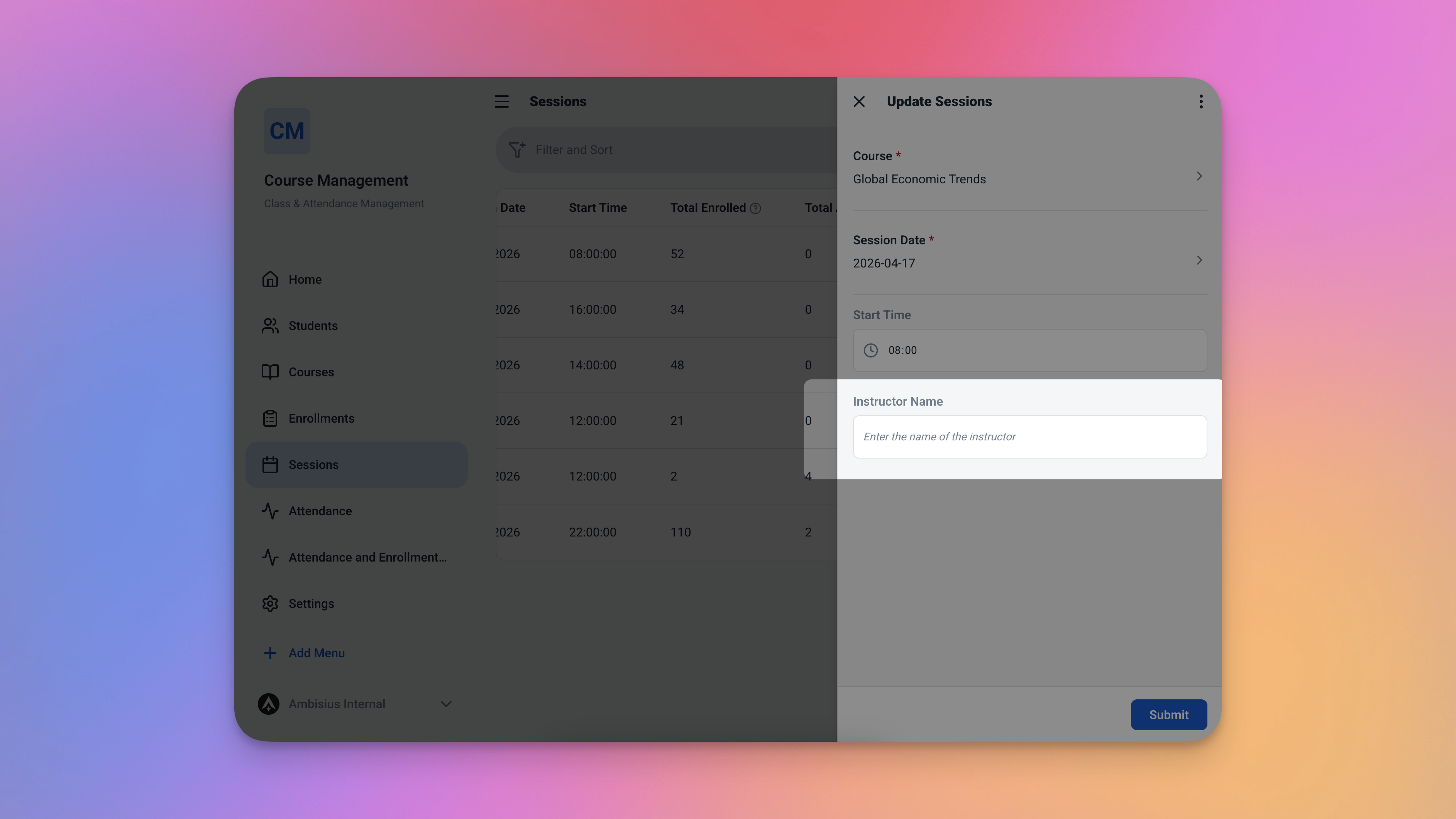
The updated Sessions form with the new Instructor field — added in seconds, no coding involved.
Already know what you need? Just type it in plain language — the AI builds it for you. No technical knowledge, no configuration screens, no waiting.
Frequently Asked Questions
-
Can I use this template for free?Yes. The Class & Attendance Tracker template is free to activate. Exploring and chatting with the AI costs nothing — credits are only used when you confirm a change to the app.
-
What happens when a course reaches its maximum capacity?The app blocks any new enrollment attempt automatically. No student can be added to a full course — no manual checking required.
-
Can the same student attend multiple courses?Yes. A student can be enrolled in as many courses as you like. Each enrollment is tracked separately and counts toward the capacity of each individual course.
-
How is the attendance rate calculated?The app counts how many students attended a session, divides it by the total enrolled in that course, and multiplies by 100. It updates automatically every time attendance is marked.
-
Can I track attendance for past sessions?Yes. You can create a session with a past date and mark attendance for it — the app treats it the same as any other session, and the rate calculates correctly.
-
Does this work on mobile?Yes. Ambisius works on iOS, Android, tablet, and any desktop browser. The same app works seamlessly across all devices your team uses.
Know Who Shows Up. Every Single Time.
A paper register can tell you who was present today. It can't tell you which student has been missing for three weeks, which course is filling up fast, or whether your overall attendance is trending down.
The Ambisius Class & Attendance Tracker gives you all of that — automatically. Enrollments are capped. Attendance rates are calculated. Your schedule is always in view. And it all lives in one app your whole team can use, on any device, from anywhere.
Free to use. Ready in minutes. No coding, no setup, no stress.
